How does a smart curtain know when to stop?
At seven in the morning the curtain opens, even though nobody is holding a button. The interesting part is what happens at the other end of the trip. This controller has two very different ways to stop the motor.
Hardware
- ESP32-C3 SuperMini controller with a USB data cable
- TA6586 motor driver and a reversible DC motor matched to the drive and supply
- 12 V DC supply and input switch, with a separate regulated logic supply as shown in the drawing
- Two momentary buttons for OPEN and CLOSE, a status LED and its current-limiting resistor
- Curtain track and cord, a shaft coupling, a mounting bracket and suitable fasteners
- The firmware notes recommend external 10 kΩ pull-down resistors on GPIO6 and GPIO7
Follow the cord
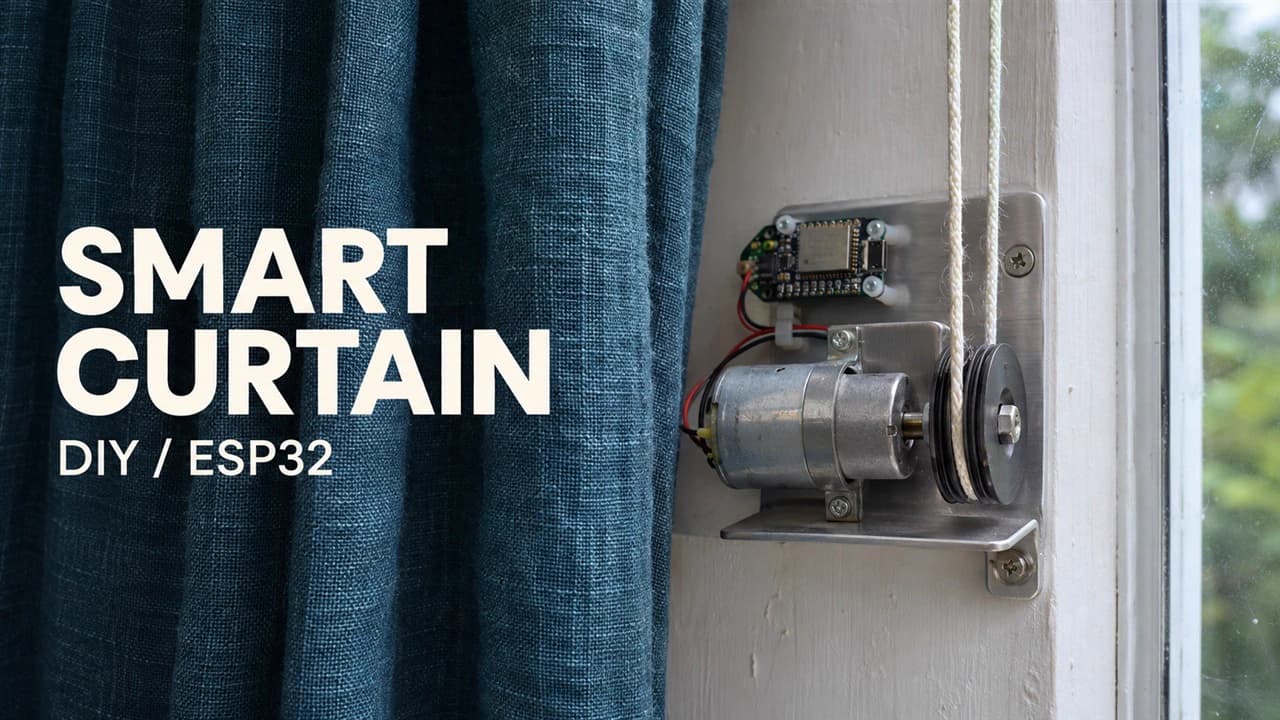
The motor sits beside the window. Its shaft drives the curtain cord, so the same motor opens or closes the curtain when the driver reverses direction. The ESP32-C3 makes the decision, the TA6586 drives the motor, and the cord moves the fabric.
Try three actions in order. Hold OPEN and the motor starts. Let go halfway and it stops. Hold CLOSE and the motor runs in the opposite direction. The phone controls work the same way as the two physical buttons.
Read the board before connecting it
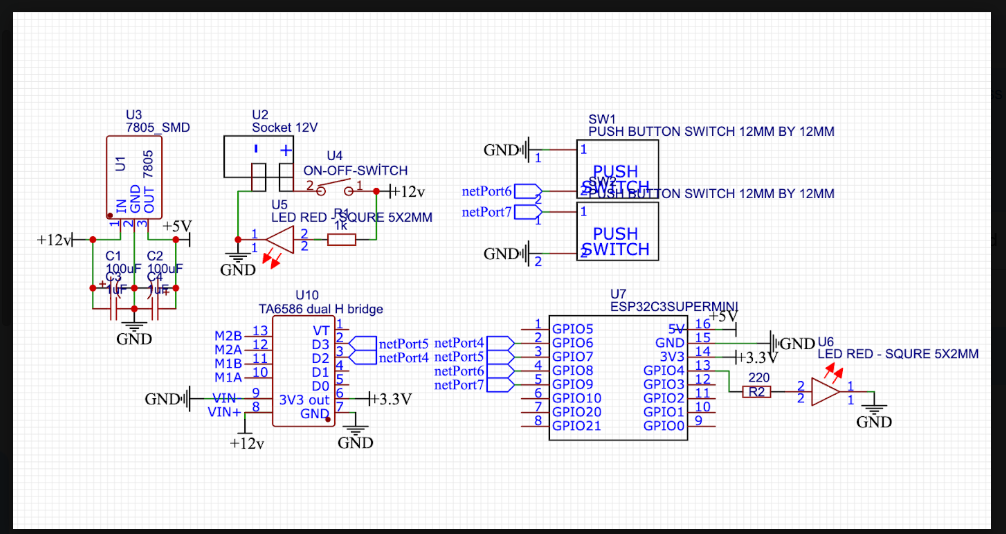
The schematic shows a 12 V input, a 7805 regulator for the 5 V rail, an ESP32-C3 SuperMini, a TA6586 driver, and switches wired to ground. The 12 V input belongs to the motor power path. Verify the regulated logic supply before connecting the controller.
In the supplied sketch, GPIO6 and GPIO7 command the driver, GPIO8 and GPIO9 read the active-low buttons, and GPIO4 drives the status LED. The sketch calls the driver commands D0 and D1, while the supplied drawing labels its input nets differently. Check your PCB revision and driver pinout before applying power. The PNG is a circuit reference; it does not establish which driver terminals to wire on an unknown board.
The motor model, rated current, bracket dimensions and PCB manufacturing files were not supplied. Select the motor, driver, supply and coupling for your own curtain load. Test direction with the cord detached first.
Load the firmware and open the dashboard
The complete sketch includes the browser interface, Wi-Fi server, motor controls, daily timer and saved settings. The ESP32 Arduino board package provides the libraries it uses.
The downloadable sketch compiled for an ESP32-C3 target with Arduino-ESP32 3.3.12. The dashboard uses arrow functions so its JavaScript passes Arduino sketch preprocessing. Browser checks covered hold, release and saving the travel time. The actual motor, wiring and endpoints still need a bench test on your board.
- Extract the project ZIP and open SmartCurtain/SmartCurtain.ino in Arduino IDE. Install the esp32 package by Espressif Systems in Boards Manager. Select a matching ESP32-C3 board profile and the USB port.
- In your local copy, set HOME_SSID and HOME_PASSWORD to your network credentials. For direct access only, use an empty HOME_SSID. Set your own AP_PASSWORD of at least eight characters before uploading; the controller starts its access point even when it joins your home network.
- Upload over USB. Open Serial Monitor at 115200 baud, then reset the board if you missed the boot messages. For native USB on the C3, enable USB CDC On Boot if the monitor stays blank.
- On the same home Wi-Fi, enter the printed home dashboard address in your phone browser. Alternatively, join the SmartCurtain access point using your chosen password and open the printed AP Dashboard address. The dashboard is local and has no application login. Keep it on a trusted network.
Measure the trip before setting the timer
Start at a known endpoint. With the mounted drive supervised, time a complete opening and release the button when the curtain reaches its intended position. The manual run also has a time cap. If it expires before the endpoint, stop and adjust the permitted duration before repeating the test.
If a full opening takes 12 seconds, set Motor travel duration to 12 and choose Save settings with the motor stopped. Twelve seconds is an example. The default is 15 seconds, and the adjustable range is 5–60 seconds. The same setting applies to both directions, so check the closing trip too.
Set a morning opening and evening closing
Check that the dashboard clock shows the right local time. The sketch uses India Standard Time. It can obtain time over Wi-Fi or take the phone’s time when its own clock has not yet been set.
Enable Morning open and Evening close, pick your times, and choose Save settings. The initial times are 07:00 and 22:00, with both schedules off until enabled. The schedule and runtime persist across a restart; the controller still needs a valid clock to run them.
At the chosen minute the controller starts the motor and stops it when the configured time elapses. If a cord slips or the curtain started halfway along the track, the timer cannot tell where the fabric ended up.
What to check on the bench
No address in Serial Monitor? Recheck the board, port and baud rate, then reset. If the home network did not connect, use the printed access-point address while your phone is joined to SmartCurtain.
Phone control stops unexpectedly? Keep the button held and check the Wi-Fi link. The firmware stops a web-controlled run if its heartbeat disappears for about 1.8 seconds. Every run also has the configured maximum duration.
Schedule did nothing? Check the device clock, make sure the relevant toggle is on, and save with the motor stopped. Use a future minute for the test. The dashboard illustration reflects the command and does not measure the curtain’s position.
What would change in V2?
V1 answers “How long has the motor run?” A proposed V2 could answer “Has the curtain arrived?” by placing a limit switch at each end of the track and stopping motion in that direction when the curtain actuates it. The timer could remain as a backup. Limit switches are a future improvement; the downloadable V1 firmware uses elapsed time.
Schematic
Build files
Open the sketch in Arduino IDE or download the kit to keep the files together.
Read the complete firmware
/*
  SmartCurtain — Final Firmware
  Board: ESP32-C3 SuperMini
  Motor Driver: TA6586

  Interface: Original user-provided premium dashboard

  Features:
  - Single-screen responsive interface
  - Animated curtain illustration
  - Press-and-hold OPEN/CLOSE
  - Physical OPEN/CLOSE buttons
  - Adjustable motor runtime
  - Daily automatic schedules
  - Persistent settings
  - Wi-Fi AP + optional home Wi-Fi
  - Serial Monitor home IP display
  - Phone time synchronization
  - India timezone
  - Motor timeout and startup protection

  IMPORTANT:
  External 10k pull-down resistors recommended
  on GPIO 6 and GPIO 7.
*/

#include <WiFi.h>
#include <WebServer.h>
#include <Preferences.h>
#include <time.h>
#include <sys/time.h>

// =====================================================
// PIN CONFIGURATION
// =====================================================

#define MOTOR_D0 6
#define MOTOR_D1 7

#define STATUS_LED 4

#define BUTTON_UP 8
#define BUTTON_DOWN 9

// =====================================================
// WIFI CONFIGURATION
// =====================================================

const char* AP_SSID = "SmartCurtain";
const char* AP_PASSWORD = "curtain123";

// Home Wi-Fi credentials
const char* HOME_SSID = "wifi ssid";
const char* HOME_PASSWORD = "wifi pass";

// =====================================================
// OBJECTS
// =====================================================

WebServer server(80);
Preferences preferences;

// =====================================================
// SETTINGS
// =====================================================

uint8_t motorRuntime = 15;

String openTime = "07:00";
String closeTime = "22:00";

bool openEnabled = false;
bool closeEnabled = false;

// =====================================================
// MOTOR STATE
// =====================================================

enum MotorState {
  STOPPED,
  WEB_UP,
  WEB_DOWN,
  PHYSICAL_UP,
  PHYSICAL_DOWN,
  AUTO_UP,
  AUTO_DOWN
};

MotorState motorState = STOPPED;

unsigned long motorStartTime = 0;
unsigned long lastHeartbeat = 0;

const unsigned long HEARTBEAT_TIMEOUT = 1800;

bool previousUpPressed = false;
bool previousDownPressed = false;

int lastAutoDate = -1;
int lastAutoMinute = -1;

bool homeIPPrinted = false;

// =====================================================
// STARTUP MOTOR PROTECTION
// =====================================================

void stopMotorAtStartup() {

  digitalWrite(MOTOR_D0, LOW);
  digitalWrite(MOTOR_D1, LOW);

  pinMode(MOTOR_D0, OUTPUT);
  pinMode(MOTOR_D1, OUTPUT);

  digitalWrite(MOTOR_D0, LOW);
  digitalWrite(MOTOR_D1, LOW);
}

void stopMotorOutputs() {

  digitalWrite(MOTOR_D0, LOW);
  digitalWrite(MOTOR_D1, LOW);
}

// =====================================================
// MOTOR CONTROL
// =====================================================

void stopMotor() {

  stopMotorOutputs();

  motorState = STOPPED;

  digitalWrite(STATUS_LED, LOW);
}

void startMotor(MotorState newState) {

  if (motorState != STOPPED) {
    return;
  }

  stopMotorOutputs();

  delay(5);

  // CORRECTED MOTOR DIRECTIONS
  //
  // OPEN:
  // D0 HIGH, D1 LOW
  //
  // CLOSE:
  // D0 LOW, D1 HIGH

  if (newState == WEB_UP ||
      newState == PHYSICAL_UP ||
      newState == AUTO_UP) {

    digitalWrite(MOTOR_D0, HIGH);
    digitalWrite(MOTOR_D1, LOW);

  }

  else if (newState == WEB_DOWN ||
           newState == PHYSICAL_DOWN ||
           newState == AUTO_DOWN) {

    digitalWrite(MOTOR_D0, LOW);
    digitalWrite(MOTOR_D1, HIGH);

  }

  else {
    return;
  }

  motorState = newState;

  motorStartTime = millis();
  lastHeartbeat = millis();

  digitalWrite(STATUS_LED, HIGH);
}

bool isWebMotor() {

  return motorState == WEB_UP ||
         motorState == WEB_DOWN;
}

String motorDirection() {

  if (motorState == WEB_UP ||
      motorState == PHYSICAL_UP ||
      motorState == AUTO_UP) {

    return "Opening";
  }

  if (motorState == WEB_DOWN ||
      motorState == PHYSICAL_DOWN ||
      motorState == AUTO_DOWN) {

    return "Closing";
  }

  return "Stopped";
}

// =====================================================
// MOTOR TIMEOUTS
// =====================================================

void handleMotorTimeouts() {

  if (motorState == STOPPED) {
    return;
  }

  unsigned long now = millis();

  unsigned long maxRuntime =
      (unsigned long)motorRuntime * 1000UL;

  if (now - motorStartTime >= maxRuntime) {

    stopMotor();
    return;
  }

  if (isWebMotor()) {

    if (now - lastHeartbeat >= HEARTBEAT_TIMEOUT) {

      stopMotor();
    }
  }
}

// =====================================================
// TIME FUNCTIONS
// =====================================================

bool clockIsValid() {

  return time(nullptr) > 1700000000;
}

String currentClock() {

  if (!clockIsValid()) {
    return "Time not set";
  }

  struct tm timeinfo;

  if (!getLocalTime(&timeinfo, 20)) {
    return "Time unavailable";
  }

  char buffer[16];

  strftime(buffer, sizeof(buffer), "%H:%M:%S", &timeinfo);

  return String(buffer);
}

bool validTimeString(const String& value) {

  if (value.length() != 5) {
    return false;
  }

  if (value.charAt(2) != ':') {
    return false;
  }

  if (!isDigit(value.charAt(0)) ||
      !isDigit(value.charAt(1)) ||
      !isDigit(value.charAt(3)) ||
      !isDigit(value.charAt(4))) {

    return false;
  }

  int hour = value.substring(0, 2).toInt();
  int minute = value.substring(3, 5).toInt();

  return hour >= 0 && hour <= 23 &&
         minute >= 0 && minute <= 59;
}

// =====================================================
// SETTINGS STORAGE
// =====================================================

void loadSettings() {

  preferences.begin("smartcurtain", false);

  motorRuntime = preferences.getUChar("runtime", 15);

  if (motorRuntime < 5 || motorRuntime > 60) {
    motorRuntime = 15;
  }

  openTime = preferences.getString("openTime", "07:00");
  closeTime = preferences.getString("closeTime", "22:00");

  openEnabled = preferences.getBool("openEnabled", false);
  closeEnabled = preferences.getBool("closeEnabled", false);

  if (!validTimeString(openTime)) {
    openTime = "07:00";
  }

  if (!validTimeString(closeTime)) {
    closeTime = "22:00";
  }
}

void saveSettings() {

  preferences.putUChar("runtime", motorRuntime);

  preferences.putString("openTime", openTime);
  preferences.putString("closeTime", closeTime);

  preferences.putBool("openEnabled", openEnabled);
  preferences.putBool("closeEnabled", closeEnabled);
}

// =====================================================
// AUTOMATIC SCHEDULES
// =====================================================

void handleSchedules() {

  if (!clockIsValid()) {
    return;
  }

  struct tm timeinfo;

  if (!getLocalTime(&timeinfo, 10)) {
    return;
  }

  int currentDate =
      (timeinfo.tm_year + 1900) * 10000 +
      (timeinfo.tm_mon + 1) * 100 +
      timeinfo.tm_mday;

  int currentMinute =
      timeinfo.tm_hour * 60 +
      timeinfo.tm_min;

  if (currentDate == lastAutoDate &&
      currentMinute == lastAutoMinute) {

    return;
  }

  bool shouldOpen =
      openEnabled &&
      timeinfo.tm_hour == openTime.substring(0, 2).toInt() &&
      timeinfo.tm_min == openTime.substring(3, 5).toInt();

  bool shouldClose =
      closeEnabled &&
      timeinfo.tm_hour == closeTime.substring(0, 2).toInt() &&
      timeinfo.tm_min == closeTime.substring(3, 5).toInt();

  if (!shouldOpen && !shouldClose) {

    lastAutoDate = currentDate;
    lastAutoMinute = currentMinute;

    return;
  }

  if (motorState != STOPPED) {
    return;
  }

  lastAutoDate = currentDate;
  lastAutoMinute = currentMinute;

  if (shouldOpen) {
    startMotor(AUTO_UP);
  }

  else if (shouldClose) {
    startMotor(AUTO_DOWN);
  }
}

// =====================================================
// DASHBOARD INTERFACE — ORIGINAL DESIGN
// =====================================================

const char INDEX_HTML[] PROGMEM = R"rawliteral(
<!DOCTYPE html>
<html lang="en">
<head>
<meta charset="UTF-8">
<meta name="viewport" content="width=device-width,initial-scale=1,maximum-scale=1,user-scalable=no">
<meta name="theme-color" content="#f4f6fb">
<title>SmartCurtain</title>

<style>
*{box-sizing:border-box;-webkit-tap-highlight-color:transparent}
html,body{margin:0;width:100%;height:100%;overflow:hidden}
body{background:#f4f6fb;color:#202635;font-family:-apple-system,BlinkMacSystemFont,"Segoe UI",sans-serif}
button,input{font:inherit}
button{cursor:pointer}
.app{width:100%;height:100dvh;max-width:600px;margin:auto;padding:clamp(7px,1.6vh,15px);display:flex;flex-direction:column;gap:clamp(5px,1vh,10px);overflow:hidden}
.header{display:flex;align-items:center;justify-content:space-between;flex-shrink:0;min-height:36px}
.brand{display:flex;align-items:center;gap:9px}
.logo{width:35px;height:35px;border-radius:12px;display:grid;place-items:center;background:linear-gradient(135deg,#70a0ff,#3979f6);color:white;font-size:22px}
.brand-name{font-size:15px;font-weight:800;letter-spacing:-.4px}
.brand-sub{font-size:10px;color:#9299aa;margin-top:2px}
.connection{display:flex;align-items:center;gap:6px;padding:7px 9px;border:1px solid #e9edf5;border-radius:20px;background:white;font-size:10px;color:#70788a}
.dot{width:7px;height:7px;border-radius:50%;background:#21b982;display:inline-block;flex-shrink:0}
.dot.offline{background:#e8a442}
.intro{flex-shrink:0}
.intro h1{font-size:clamp(19px,4.8vw,25px);margin:0;letter-spacing:-.8px;font-weight:800}
.intro p{font-size:11px;color:#9299aa;margin:3px 0 0}
.curtain-card{flex:1;min-height:0;background:white;border:1px solid #e9edf5;border-radius:21px;padding:clamp(9px,1.6vh,15px);display:flex;flex-direction:column;box-shadow:0 5px 20px #293d6508}
.card-top{display:flex;justify-content:space-between;align-items:center;flex-shrink:0}
.room-name{font-size:13px;font-weight:750}
.room-sub{font-size:10px;color:#9299aa;margin-top:3px}
.status{display:flex;align-items:center;gap:5px;border-radius:20px;background:#eaf9f2;color:#159d6b;padding:7px 9px;font-size:10px;font-weight:750;white-space:nowrap}
.status.moving{background:#eaf1ff;color:#3979f6}
.room{flex:1;min-height:60px;position:relative;overflow:hidden;margin:clamp(6px,1.3vh,12px) 0;border-radius:15px;background:linear-gradient(180deg,#eaf1fd,#f6f8fc)}
.window{position:absolute;top:10px;bottom:10px;left:50%;transform:translateX(-50%);width:65%;border:5px solid white;background:linear-gradient(135deg,#c9e0ff,#f5faff,#b8d7ff);box-shadow:0 3px 15px #7795c522}
.window:before{content:"";position:absolute;top:0;bottom:0;left:49%;width:2%;background:white}
.window:after{content:"";position:absolute;left:0;right:0;top:49%;height:2%;background:white}
.sun{position:absolute;width:23px;height:23px;border-radius:50%;background:#fff0b8;top:15px;right:15px}
.track{position:absolute;z-index:3;top:7px;left:14%;right:14%;height:4px;border-radius:5px;background:#d1d9e7}
.fabric{position:absolute;top:11px;bottom:10px;left:16%;right:16%;display:flex;z-index:2;overflow:hidden}
.panel{flex:1;min-width:0;background:repeating-linear-gradient(90deg,#7191ef 0,#7191ef 7px,#5579df 8px,#86a1f4 14px);transition:flex .7s ease}
.panel.right{background:repeating-linear-gradient(90deg,#86a1f4 0,#86a1f4 7px,#5579df 8px,#7191ef 14px)}
.room.open .panel{flex:.15}
.room.moving .panel{animation:pulse .8s ease-in-out infinite alternate}
@keyframes pulse{from{opacity:.88}to{opacity:1}}
.controls{flex-shrink:0;display:grid;grid-template-columns:1fr 1fr;gap:9px}
.btn{height:clamp(40px,7.5vh,56px);border:0;border-radius:13px;display:flex;align-items:center;justify-content:center;gap:8px;font-size:13px;font-weight:800;touch-action:none;user-select:none}
.btn svg{width:19px;height:19px}
.btn:active{transform:scale(.98)}
.open-btn{color:white;background:linear-gradient(135deg,#5791ff,#3974ef);box-shadow:0 5px 12px #3979f624}
.close-btn{color:#384258;background:#f0f3f9;border:1px solid #e8ecf4}
.hint{flex-shrink:0;text-align:center;font-size:9px;color:#a0a7b5;padding-top:5px}
.settings-card{flex-shrink:0;background:white;border:1px solid #e9edf5;border-radius:18px;padding:clamp(8px,1.3vh,12px);box-shadow:0 5px 20px #293d6508}
.settings-heading{display:flex;align-items:center;justify-content:space-between;margin-bottom:7px}
.settings-title{font-size:13px;font-weight:800}
.clock{font-size:10px;color:#9299aa}
.schedule-grid{display:grid;grid-template-columns:1fr 1fr;gap:8px}
.schedule{min-width:0;border-radius:12px;background:#f6f8fc;padding:8px}
.schedule-top{display:flex;align-items:center;justify-content:space-between;gap:5px}
.schedule-name{font-size:10px;font-weight:750}
.toggle{position:relative;width:33px;height:20px;flex-shrink:0}
.toggle input{opacity:0;width:0;height:0}
.switch{position:absolute;inset:0;border-radius:20px;background:#dce1e9;cursor:pointer;transition:.2s}
.switch:before{content:"";position:absolute;width:14px;height:14px;left:3px;top:3px;border-radius:50%;background:white;box-shadow:0 1px 3px #0002;transition:.2s}
.toggle input:checked+.switch{background:#34c889}
.toggle input:checked+.switch:before{transform:translateX(13px)}
.schedule-controls{margin-top:6px}
.time{width:100%;min-width:0;padding:6px 4px;border:1px solid #e5eaf3;border-radius:8px;background:white;font-size:12px;font-weight:700;color:#30384a;outline:none}
.runtime-row{display:flex;align-items:center;justify-content:space-between;gap:8px;margin-top:8px}
.runtime-label{font-size:10px;font-weight:750}
.runtime-value{color:#3979f6;font-size:12px;font-weight:800;white-space:nowrap}
input[type=range]{display:block;width:100%;height:13px;margin:4px 0 0;accent-color:#3979f6}
.bottom-row{display:flex;align-items:center;gap:8px;margin-top:5px}
.save-btn{flex:1;height:34px;border:0;border-radius:9px;background:#3979f6;color:white;font-size:11px;font-weight:800}
.save-btn:disabled{opacity:.6}
.save-message{font-size:9px;color:#8d95a5;flex:1;text-align:right}
.footer{flex-shrink:0;display:flex;align-items:center;justify-content:space-between;font-size:9px;color:#a1a8b7;padding:0 3px}
@media(max-height:650px){.app{padding:6px 9px;gap:4px}.logo{width:30px;height:30px;border-radius:10px}.header{min-height:30px}.brand-name{font-size:14px}.brand-sub{font-size:9px}.intro h1{font-size:18px}.intro p{font-size:9px}.curtain-card{padding:7px;border-radius:16px}.room{margin:5px 0;min-height:48px}.btn{height:36px}.hint{padding-top:3px}.settings-card{padding:6px;border-radius:14px}.settings-heading{margin-bottom:4px}.schedule{padding:5px}.schedule-controls{margin-top:3px}.time{padding:4px 2px}.runtime-row{margin-top:4px}.bottom-row{margin-top:3px}.save-btn{height:28px}}
@media(max-height:520px){.intro{display:none}.room{min-height:42px}.curtain-card,.settings-card{padding:5px}.footer{font-size:8px}}
@media(prefers-reduced-motion:reduce){*,*::before,*::after{animation-duration:.01ms!important;transition-duration:.01ms!important}}
</style>
</head>

<body>
<main class="app">

<header class="header">
  <div class="brand">
    <div class="logo">▥</div>
    <div>
      <div class="brand-name">SmartCurtain</div>
      <div class="brand-sub">Smart home control</div>
    </div>
  </div>
  <div class="connection">
    <span class="dot" id="connectionDot"></span>
    <span id="connectionLabel">Local control</span>
  </div>
</header>

<section class="intro">
  <h1>Your home, your comfort.</h1>
  <p>Control your curtains with a single touch.</p>
</section>

<section class="curtain-card">
  <div class="card-top">
    <div>
      <div class="room-name">Living Room</div>
      <div class="room-sub">Smart curtain controller</div>
    </div>
    <div class="status" id="statusPill">
      <span class="dot"></span>
      <span id="motorStatus">Standby</span>
    </div>
  </div>

  <div class="room" id="room">
    <div class="sun"></div>
    <div class="window"></div>
    <div class="track"></div>
    <div class="fabric">
      <div class="panel"></div>
      <div class="panel right"></div>
    </div>
  </div>

  <div class="controls">
    <button class="btn open-btn" id="upBtn">
      <svg viewBox="0 0 24 24" fill="none" stroke="currentColor" stroke-width="2" stroke-linecap="round" stroke-linejoin="round"><path d="M12 19V5M5 12l7-7 7 7"/></svg>
      OPEN
    </button>
    <button class="btn close-btn" id="downBtn">
      <svg viewBox="0 0 24 24" fill="none" stroke="currentColor" stroke-width="2" stroke-linecap="round" stroke-linejoin="round"><path d="M12 5v14m-7-7 7 7 7-7"/></svg>
      CLOSE
    </button>
  </div>
  <div class="hint">Press and hold to move · Release to stop</div>
</section>

<section class="settings-card">
  <div class="settings-heading">
    <div class="settings-title">Daily Automation</div>
    <div class="clock" id="deviceTime">Checking time...</div>
  </div>

  <div class="schedule-grid">
    <div class="schedule">
      <div class="schedule-top">
        <span class="schedule-name">☀ Morning open</span>
        <label class="toggle">
          <input type="checkbox" id="openEnabled">
          <span class="switch"></span>
        </label>
      </div>
      <div class="schedule-controls">
        <input class="time" type="time" id="openTime" value="07:00">
      </div>
    </div>

    <div class="schedule">
      <div class="schedule-top">
        <span class="schedule-name">☾ Evening close</span>
        <label class="toggle">
          <input type="checkbox" id="closeEnabled">
          <span class="switch"></span>
        </label>
      </div>
      <div class="schedule-controls">
        <input class="time" type="time" id="closeTime" value="22:00">
      </div>
    </div>
  </div>

  <div class="runtime-row">
    <div class="runtime-label">Motor travel duration</div>
    <div class="runtime-value"><span id="runtimeDisplay">15</span> seconds</div>
  </div>

  <input type="range" id="runtime" min="5" max="60" step="1" value="15">

  <div class="bottom-row">
    <button class="save-btn" id="saveBtn">Save settings</button>
    <div class="save-message" id="saveMessage">Ready</div>
  </div>
</section>

<footer class="footer">
  <span>SMARTCURTAIN</span>
  <span id="homeStatus">Local Wi-Fi</span>
  <span>ESP32-C3</span>
</footer>

</main>

<script>
let movingFromWeb=false;
let heartbeatTimer=null;
let lastSyncAttempt=0;
let saving=false;

const $=id=>document.getElementById(id);

const showMessage = (message,success=true) => {
  $("saveMessage").textContent=message;
  $("saveMessage").style.color=success?"#159c6a":"#d35454";
};

const stopMove = () => {
  if(!movingFromWeb)return;

  movingFromWeb=false;

  if(heartbeatTimer){
    clearInterval(heartbeatTimer);
    heartbeatTimer=null;
  }

  fetch("/stop",{method:"POST",cache:"no-store"}).catch(()=>{});
};

const startMove = (direction) => {
  if(movingFromWeb)return;

  movingFromWeb=true;

  fetch(direction==="up"?"/up":"/down",{
    method:"POST",
    cache:"no-store"
  }).catch(()=>{});

  heartbeatTimer=setInterval(()=>{
    if(movingFromWeb){
      fetch("/keepalive",{
        method:"POST",
        cache:"no-store"
      }).catch(()=>{});
    }
  },400);
};

const attachHold = (id,direction) => {
  const button=$(id);

  button.addEventListener("pointerdown",event=>{
    event.preventDefault();
    try{button.setPointerCapture(event.pointerId)}catch(e){}
    startMove(direction);
  });

  button.addEventListener("pointerup",event=>{
    event.preventDefault();
    stopMove();
  });

  button.addEventListener("pointercancel",stopMove);
  button.addEventListener("lostpointercapture",stopMove);
};

attachHold("upBtn","up");
attachHold("downBtn","down");

window.addEventListener("pointerup",stopMove);
window.addEventListener("blur",stopMove);

document.addEventListener("visibilitychange",()=>{
  if(document.hidden)stopMove();
});

$("runtime").addEventListener("input",()=>{
  $("runtimeDisplay").textContent=$("runtime").value;
});

const syncPhoneTime = async () => {
  const now=Date.now();

  if(now-lastSyncAttempt<30000)return;

  lastSyncAttempt=now;

  try{
    await fetch("/syncTime?epoch="+Math.floor(now/1000),{
      method:"POST",
      cache:"no-store"
    });
  }catch(e){}
};

const loadStatus = async () => {
  try{
    const response=await fetch("/status",{cache:"no-store"});

    if(!response.ok)throw new Error();

    const s=await response.json();
    const moving=Boolean(s.moving);

    $("motorStatus").textContent=moving?s.direction:"Standby";

    $("statusPill").classList.toggle("moving",moving);
    $("room").classList.toggle("moving",moving);
    $("room").classList.toggle("open",s.direction==="Opening");

    $("deviceTime").textContent=s.clock;

    $("homeStatus").textContent=
      s.homeConnected?"Home Wi-Fi connected":"Local Wi-Fi";

    $("connectionLabel").textContent=
      s.homeConnected?"Home connected":"Local control";

    $("connectionDot").classList.toggle(
      "offline",!s.homeConnected
    );

    if(!saving){
      if(document.activeElement!==$("runtime")){
        $("runtime").value=s.runtime;
        $("runtimeDisplay").textContent=s.runtime;
      }

      if(document.activeElement!==$("openTime")){
        $("openTime").value=s.openTime;
      }

      if(document.activeElement!==$("closeTime")){
        $("closeTime").value=s.closeTime;
      }

      $("openEnabled").checked=s.openEnabled;
      $("closeEnabled").checked=s.closeEnabled;
    }

    if(!s.clockValid){
      syncPhoneTime();
    }

  }catch(e){
    $("connectionLabel").textContent="Reconnecting";
    $("connectionDot").classList.add("offline");
  }
};

$("saveBtn").addEventListener("click",async()=>{
  if(saving)return;

  const runtime=Number($("runtime").value);
  const ot=$("openTime").value;
  const ct=$("closeTime").value;

  if(!ot||!ct||runtime<5||runtime>60){
    showMessage("Check settings",false);
    return;
  }

  const data=new URLSearchParams();

  data.set("runtime",String(runtime));
  data.set("openTime",ot);
  data.set("closeTime",ct);
  data.set("openEnabled",$("openEnabled").checked?"1":"0");
  data.set("closeEnabled",$("closeEnabled").checked?"1":"0");

  saving=true;
  $("saveBtn").disabled=true;
  $("saveBtn").textContent="Saving...";

  try{
    const response=await fetch("/save",{
      method:"POST",
      headers:{"Content-Type":"application/x-www-form-urlencoded"},
      body:data.toString(),
      cache:"no-store"
    });

    if(!response.ok)throw new Error();

    showMessage("Settings saved");
    await loadStatus();

  }catch(e){
    showMessage("Save failed",false);
  }finally{
    saving=false;
    $("saveBtn").disabled=false;
    $("saveBtn").textContent="Save settings";
  }
});

loadStatus();
setInterval(loadStatus,2000);
</script>
</body>
</html>
)rawliteral";

// =====================================================
// WEB: STATUS
// =====================================================

void handleStatus() {

  String json = "{";

  json += "\"moving\":";
  json += (motorState != STOPPED) ? "true" : "false";

  json += ",\"direction\":\"";
  json += motorDirection();
  json += "\"";

  json += ",\"runtime\":";
  json += String(motorRuntime);

  json += ",\"openTime\":\"";
  json += openTime;
  json += "\"";

  json += ",\"closeTime\":\"";
  json += closeTime;
  json += "\"";

  json += ",\"openEnabled\":";
  json += openEnabled ? "true" : "false";

  json += ",\"closeEnabled\":";
  json += closeEnabled ? "true" : "false";

  json += ",\"clock\":\"";
  json += currentClock();
  json += "\"";

  json += ",\"clockValid\":";
  json += clockIsValid() ? "true" : "false";

  json += ",\"homeConnected\":";
  json += (WiFi.status() == WL_CONNECTED) ? "true" : "false";

  json += "}";

  server.sendHeader("Cache-Control", "no-store");
  server.send(200, "application/json", json);
}

// =====================================================
// WEB: TIME SYNCHRONIZATION
// =====================================================

void handleSyncTime() {

  if (!server.hasArg("epoch")) {
    server.send(400, "text/plain", "Missing epoch");
    return;
  }

  if (!clockIsValid()) {

    long long epoch = server.arg("epoch").toInt();

    if (epoch > 1700000000LL) {

      struct timeval tv;

      tv.tv_sec = (time_t)epoch;
      tv.tv_usec = 0;

      settimeofday(&tv, nullptr);
    }
  }

  server.send(200, "text/plain", "OK");
}

// =====================================================
// WEB: SAVE SETTINGS
// =====================================================

void handleSave() {

  if (motorState != STOPPED) {
    server.send(409, "text/plain", "Stop motor before saving");
    return;
  }

  if (!server.hasArg("runtime") ||
      !server.hasArg("openTime") ||
      !server.hasArg("closeTime") ||
      !server.hasArg("openEnabled") ||
      !server.hasArg("closeEnabled")) {

    server.send(400, "text/plain", "Missing settings");
    return;
  }

  int newRuntime = server.arg("runtime").toInt();

  String newOpenTime = server.arg("openTime");
  String newCloseTime = server.arg("closeTime");

  if (newRuntime < 5 || newRuntime > 60 ||
      !validTimeString(newOpenTime) ||
      !validTimeString(newCloseTime)) {

    server.send(400, "text/plain", "Invalid settings");
    return;
  }

  motorRuntime = (uint8_t)newRuntime;

  openTime = newOpenTime;
  closeTime = newCloseTime;

  openEnabled =
      server.arg("openEnabled") == "1" ||
      server.arg("openEnabled") == "true";

  closeEnabled =
      server.arg("closeEnabled") == "1" ||
      server.arg("closeEnabled") == "true";

  saveSettings();

  server.send(200, "text/plain", "Saved");
}

// =====================================================
// WEB: MOTOR BUTTONS
// =====================================================

void handleUp() {

  if (motorState == STOPPED) {
    startMotor(WEB_UP);
  }

  server.send(200, "text/plain", "OK");
}

void handleDown() {

  if (motorState == STOPPED) {
    startMotor(WEB_DOWN);
  }

  server.send(200, "text/plain", "OK");
}

void handleKeepalive() {

  if (isWebMotor()) {
    lastHeartbeat = millis();
  }

  server.send(200, "text/plain", "OK");
}

void handleStop() {

  if (isWebMotor()) {
    stopMotor();
  }

  server.send(200, "text/plain", "OK");
}

// =====================================================
// PHYSICAL BUTTONS
// =====================================================

void handlePhysicalButtons() {

  bool upPressed = digitalRead(BUTTON_UP) == LOW;
  bool downPressed = digitalRead(BUTTON_DOWN) == LOW;

  if (upPressed && downPressed) {

    if (motorState == PHYSICAL_UP ||
        motorState == PHYSICAL_DOWN) {

      stopMotor();
    }

    previousUpPressed = true;
    previousDownPressed = true;

    return;
  }

  if (upPressed && !previousUpPressed) {

    if (motorState == STOPPED) {
      startMotor(PHYSICAL_UP);
    }
  }

  if (downPressed && !previousDownPressed) {

    if (motorState == STOPPED) {
      startMotor(PHYSICAL_DOWN);
    }
  }

  if (motorState == PHYSICAL_UP && !upPressed) {
    stopMotor();
  }

  if (motorState == PHYSICAL_DOWN && !downPressed) {
    stopMotor();
  }

  previousUpPressed = upPressed;
  previousDownPressed = downPressed;
}

// =====================================================
// SETUP
// =====================================================

void setup() {

  Serial.begin(115200);
  delay(500);

  Serial.println();
  Serial.println("================================");
  Serial.println("       SMART CURTAIN");
  Serial.println("================================");

  // FIRST: stop motor outputs.
  stopMotorAtStartup();

  pinMode(STATUS_LED, OUTPUT);
  digitalWrite(STATUS_LED, LOW);

  pinMode(BUTTON_UP, INPUT_PULLUP);
  pinMode(BUTTON_DOWN, INPUT_PULLUP);

  previousUpPressed = digitalRead(BUTTON_UP) == LOW;
  previousDownPressed = digitalRead(BUTTON_DOWN) == LOW;

  loadSettings();

  stopMotorOutputs();
  motorState = STOPPED;

  // ===================================================
  // WIFI
  // ===================================================

  WiFi.mode(WIFI_AP_STA);
  WiFi.setSleep(false);
  WiFi.setTxPower(WIFI_POWER_8_5dBm);

  // Start access point
  WiFi.softAP(AP_SSID, AP_PASSWORD);

  Serial.println();
  Serial.println("ACCESS POINT STARTED");

  Serial.print("AP Name: ");
  Serial.println(AP_SSID);

  Serial.print("AP Dashboard: http://");
  Serial.println(WiFi.softAPIP());

  // Optional home Wi-Fi
  if (strlen(HOME_SSID) > 0 &&
      strcmp(HOME_SSID, "YOUR_WIFI_NAME") != 0) {

    Serial.println();
    Serial.print("Connecting to home Wi-Fi: ");
    Serial.println(HOME_SSID);

    WiFi.begin(HOME_SSID, HOME_PASSWORD);

  } else {

    Serial.println();
    Serial.println("Home Wi-Fi not configured.");

  }

  // India timezone
  configTzTime(
    "IST-5:30",
    "pool.ntp.org",
    "time.google.com"
  );

  // ===================================================
  // WEB SERVER ROUTES
  // ===================================================

  server.on("/", HTTP_GET, []() {

    server.sendHeader("Cache-Control", "no-store");

    server.send_P(200, "text/html", INDEX_HTML);
  });

  server.on("/status", HTTP_GET, handleStatus);

  server.on("/syncTime", HTTP_POST, handleSyncTime);

  server.on("/save", HTTP_POST, handleSave);

  server.on("/up", HTTP_POST, handleUp);

  server.on("/down", HTTP_POST, handleDown);

  server.on("/keepalive", HTTP_POST, handleKeepalive);

  server.on("/stop", HTTP_POST, handleStop);

  server.onNotFound([]() {
    server.send(404, "text/plain", "Not found");
  });

  server.begin();

  Serial.println();
  Serial.println("WEB SERVER STARTED");
  Serial.println("================================");

  stopMotor();
}

// =====================================================
// MAIN LOOP
// =====================================================

void loop() {

  server.handleClient();

  // Print home Wi-Fi IP once connected.
  if (WiFi.status() == WL_CONNECTED && !homeIPPrinted) {

    homeIPPrinted = true;

    Serial.println();
    Serial.println("================================");
    Serial.println("HOME WIFI CONNECTED!");

    Serial.print("WiFi Name: ");
    Serial.println(WiFi.SSID());

    Serial.print("ESP32 Local IP: ");
    Serial.println(WiFi.localIP());

    Serial.print("Dashboard: http://");
    Serial.println(WiFi.localIP());

    Serial.println("================================");
  }

  handlePhysicalButtons();

  handleMotorTimeouts();

  handleSchedules();

  delay(1);
}The film
Project reference Original smart-device video ↗
← All device studies